v4.4 / closed beta

Interviews are broken.
This is the fix we actually use.

MeetHawk is an overlay that listens to your interview and drafts answers in real time. Structured. In your own voice. It's in beta. It's Windows only. It's $29/mo. No demos, no sales call. Download it and try it for seven days.

Windows 10 / 11 $29/mo Trial: 15min live + 30min practice 14-day refund
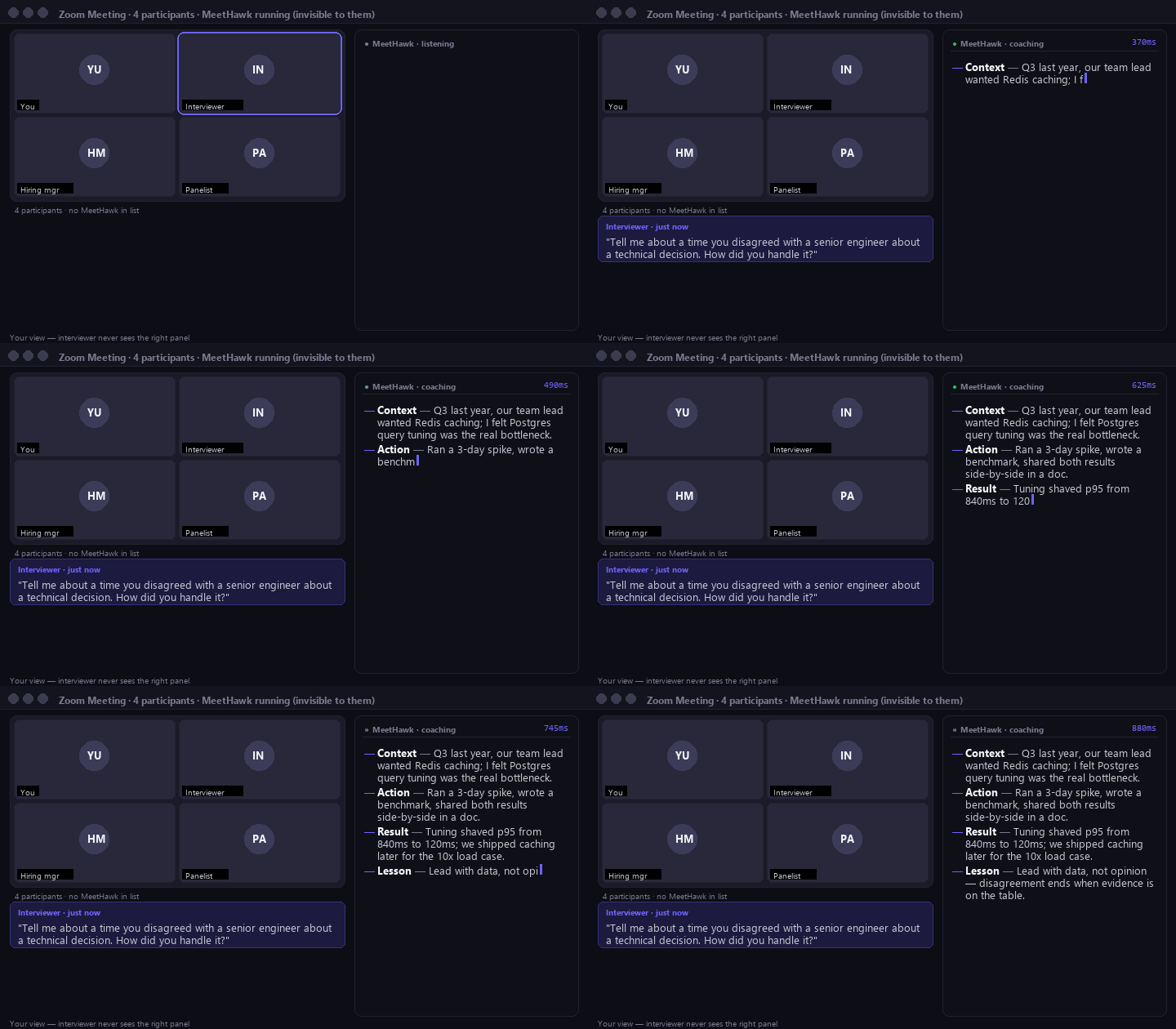
Live coached interview. v4.4.
Animated demo: an interviewer asks a behavioral question in Zoom. MeetHawk captures the audio and streams a structured answer to an overlay panel on the right. The interviewer never sees it.

Short loop from a live session. Actual product UI. No editing beyond the crop.


Who it's for

Built for the interviews you can't afford to blow.

If you prep for forty hours and still blank on one question, this is for you.

Software engineers Final-round system design, behaviorals, coding walkthroughs.
Product managers Case studies, estimation, product-sense deep-dives.
Data & analytics SQL rounds, case prompts, A/B test design, metrics debates.
A question we hear a lot

Is using MeetHawk cheating?

Companies have used AI to screen résumés since 2022, to grade take-homes, to score coding rounds, and often to auto-summarize the interview transcript itself. You already use spellcheck, IDE autocomplete, and Zoom's live captions. This is the same shape of help, moved one step closer to the moment you need it.

What MeetHawk won't do is invent experience you don't have. It pulls from your résumé and stories you've prepped. If the answer isn't there, MeetHawk can't fabricate it for you, and neither should you.

If that line feels wrong to you, don't use MeetHawk. We'd rather tell you than hide it.

How it works

Three steps. About ninety seconds.

01

Install it

One NSIS installer, ~72 MB. Windows SmartScreen will warn you on first run (see below; we're honest about that). Runs as a background service named Display Service so it stays out of taskbars.

02

Paste résumé + JD

Drop your résumé once. Drop each job description in as interviews come. MeetHawk builds a role profile, pulls your stories, and pre-loads a question bank for the company.

03

Open the overlay

Hit Ctrl+Alt+Space during the interview. The overlay stays hidden until a question is detected, then streams the answer. Mouse-through by default so you don't misclick.

Against self-interest

What MeetHawk isn't.

Four things we don't have yet. We'd rather say it on the landing page than surprise you on install day.

Unsigned
The installer isn't code-signed yet. Windows SmartScreen will warn you the first time you run it. Click More info, then Run anyway. We'll buy an EV code-signing cert once the user base justifies the $2k/yr; we didn't want to bake that into early pricing.
Windows
No Mac build yet. Building the screen-share exclusion path on macOS is a separate project and we'd rather ship one OS well. Drop your email. We'll tell you the week the port starts, not before.
Manual update
No auto-update. When a new version ships you'll get an email with release notes and a download link. This is deliberate: we don't want a silent update changing behavior during your interview.
Small base
No "trusted by 10,000 candidates" headline. We've had paying users since January 2026, and that's it. We'd rather say the real number than invent one. If that's too early for you, we get it. Bookmark the site and come back.
Social proof

We're not going to post three made-up testimonials here.

The reviews carousel on every competitor site? We can't verify any of those either. Here's what we'll offer instead.

"Want to talk to a real beta user before you pay $29? Email us and we'll introduce you to one. If no one volunteers that week, we'll tell you that too."
The MeetHawk team. Open offer since launch.

Email hello@meethawk.com with the role you're prepping for. We keep a rolling list of beta users who said yes to reference calls.

Pricing

One plan. Pay monthly. Cancel from the app.

Less than you'd spend on a single hour of interview coaching with a human.

$29/month

7-day trial: 15 min live + 30 min practice, no card. 14-day refund on paid plan.

  • Unlimited interview sessions across every role
  • Coding mode (Claude for engineering rounds)
  • Practice mode with per-company question banks
  • Phone-screen forwarding (Twilio number)
  • Local audio capture and a screen-share-invisible overlay
  • Windows 10 / 11 (Mac on waitlist)
Download (trial starts on launch) No card required. Trial ends when either the 7 days or the minute budget runs out; you'll need to pay $29/mo to keep going.
FAQ

Common questions, short answers.

Can the interviewer see MeetHawk on my screen?

No. The overlay uses the Windows screen-capture exclusion API (SetWindowDisplayAffinity(WDA_EXCLUDEFROMCAPTURE)). Zoom, Meet, Teams, Webex, and OBS all see a blank rectangle where MeetHawk is, or nothing at all. Verified on current versions of every major conferencing tool. The Mac build will use CGSSetWindowCaptureExcluded once shipped.

Does a MeetHawk bot join my interview?

No. Audio capture runs locally on your machine via WASAPI loopback. No third-party participant in the call. The interviewer sees the exact same participant list they'd see without MeetHawk.

What's the latency?

Median ~310ms from end-of-question to first word on screen. p95 is ~820ms (slower when the speech-to-text starts cold). First sentence usually forms while the interviewer's last word is still echoing.

Where does my audio go?

Captured locally. Short (~10-second) chunks are sent to Groq for transcription, then discarded per Groq's zero-retention API policy. Questions and answers are stored locally on your machine. Privacy Mode disables our cloud database entirely. We do not train on your data.

Windows or Mac?

Windows 10+ (x64) today. Mac build is on the roadmap. Join the waitlist and we'll ping you when it's ready.

What if it doesn't work for me?

Cancel from the app, email hello@meethawk.com, and we refund within 14 days. Same-day via LemonSqueezy. No retention loop, no "are you sure?" modal.

Will the installer warn me about "unknown publisher"?

Yes. Windows SmartScreen flags unsigned installers until they build reputation. Click More info, then Run anyway. We'll buy an EV cert once our user count justifies the cost. We'd rather explain it than hide it.

Your next interview is probably this week.

Install it tonight. Run one mock round. Walk in tomorrow with coached answers already on screen.